桌面版
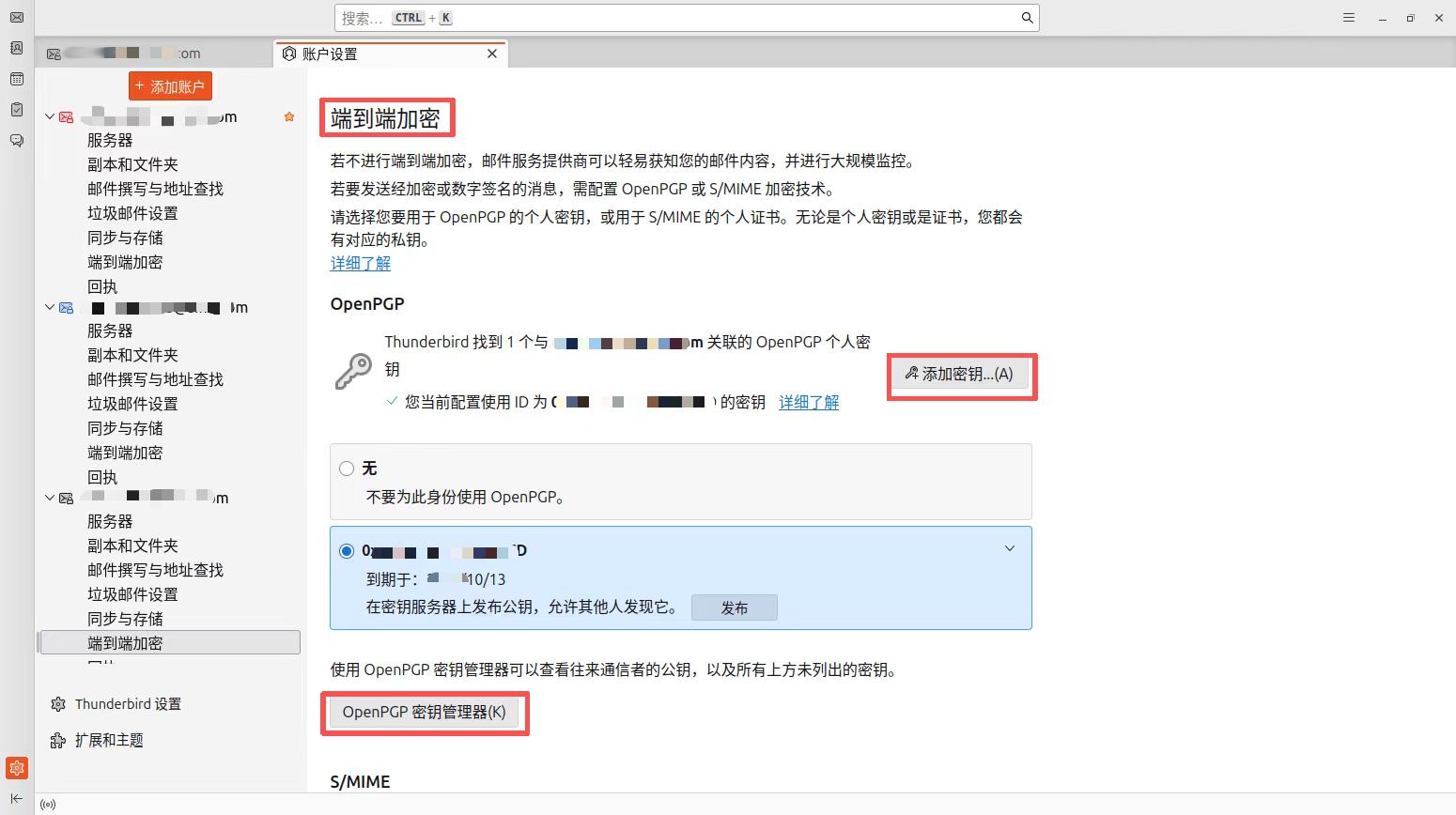
Thunderbird 支持GPG 和 S/MIME等点对点加密,本文介绍设置使用点对点功能。
设置方法很简单,都是图形界面操作,见下图:

xuenhua’s 站点

传统纸质合同公章,利用了公章在公安局备案和复刻公章的难度,从而保证合同难以伪造。自从口罩时期,不方便面签合同,电子合同开始流行。 小微企业非常欢迎电子合同,可以节省面签合同的时间和金钱成本。然而没有专业的电子签章系统,一来系统不便宜,二是考虑客户接受程度。签个合同要么下个app,要么注册个系统,可能就使用一次,客户不情愿配合注册或者下载app。于是,采用和专业电子签章看着很像的公章图片直接作为电子合同公章使用。方便是方便了,但是公章图片存在较大的伪造风险,从而引起不必要的法律纠纷。 按照当前的法律,法律对合同的形式认可相对宽松,盖章扫描件、甚至电子版PDF格式文件,都可以作为合同文件使用,但同时要求需记录双方缔约过程。其实缔约过程留痕,也非常简单,例如使用电子邮件,明确回复确认合同。利用邮箱的安全性,基本可以达到和纸质合同相当的伪造难度。
checking for bogus pkg-config... configure: error: yes, from unknown origin. This *will* break the build. Please modify your PATH variable so that pkgconf-2.5.1/pkgconf is no longer found by configure scripts.
排查思路:
make install pkg-config环境变量配置问题,但是执行pkg-config --version命令,返回0.29.2,说明pkg-config环境变量配置正确。PKG_CONFIG_PATH也没有问题,执行pkgconf --libs openssl返回 -L/opt/homebrew/Cellar/openssl@3/3.5.0/lib -lssl -lcrypto,说明pkg-config环境变量配置正确。configure文件,发现如下内容脑卒中一般发病急,无征兆或者征兆不明显,大多数脑卒中患者伴有嘴歪眼斜的症状。当前的智能摄像头有人脸识别、摔倒检测、婴儿啼哭等功能,但是对于脑卒中的监控目前尚无相关的上市产品。于是,作者基于人工智能技术,开发一款基于摄像头的脑卒中监控系统,充分利用摄像头人物跟随功能来实时监控易感人,若发现嘴歪眼斜等脑卒中症状,则立即发出警告,通知家人及时就医。
本系统采用2层卷积神经网络(CNN)进行图像识别。CNN通过卷积层和池化层进行特征提取,然后通过全连接层进行分类。 模型文件:mymodel.py
继续阅读“人工智能在脑卒中监控中的应用”